
Why Shopify Flow Is a Game Changer ?
Shopify Flow is a free automation tool that has revolutionized how merchants run their businesses, especially on the Advanced and Plus plans. Gone are the days of spending hours on manual tasks Shopify Flow uses AI-powered, no-code automation to handle repetitive processes, increase efficiency, and supercharge store operations.
In this complete guide, we’ll explore:
- What Shopify Flow is and how it can be a game-changer for your store.
- Pre-built Flow templates you can use to automate tasks immediately.
- Real-world case studies showing the ROI of automation.
- Actionable tips to implement Shopify Flow in your store without getting bogged down by complexity.
By the end, you’ll know how to use Shopify Flow to save time, reduce costs, and increase revenue all without writing a single line of code.
What Is Shopify Flow and How Does It Work?
Shopify Flow is an advanced automation tool for merchants who want to automate their store’s workflows. It seamlessly integrates with your Shopify store, tracking events, applying smart logic, and automating actions based on your defined conditions.
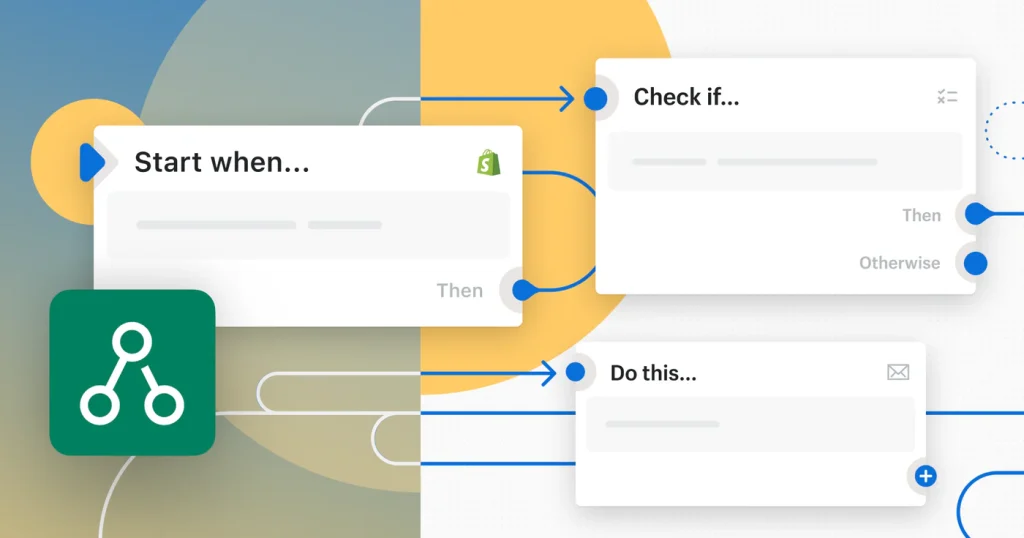
Here’s how it works:
- Trigger: Something happens in your store (like a customer placing an order or abandoning a cart).
- Condition: Shopify Flow checks for specific criteria (for instance, the order value or customer tags).
- Action(s): Shopify Flow automates the tasks you need—whether it’s tagging a customer, sending an email, or alerting your team.
Simple Example of Shopify Flow in Action:
- Trigger: A customer places an order over $250.
- Condition: The order is the customer’s first high-value purchase.
- Action: Tag the customer as “VIP” and send them an exclusive offer email.
Result: Automation that scales with your store, saving hours of manual work while enhancing customer engagement.
2026 Updates: Making Shopify Flow Smarter
With AI-powered workflow creation (via Sidekick), real-time testing, and GraphQL API enhancements, Shopify Flow has evolved to become even more powerful. Now, it’s easier than ever to automate complex tasks and create workflows that deliver measurable results.
And unlike tools like Zapier, Shopify Flow doesn’t charge per task. It’s free with Advanced and Plus plans, giving you more freedom and control over your automation.
Shopify Flow Automation Templates: Instant Solutions for Your Store
Shopify Flow offers powerful, ready-to-deploy templates that enable merchants to automate critical store operations – saving time, reducing errors, and enhancing customer experience. Whether you’re new to automation or a seasoned pro, these pre-built workflows can significantly optimize your store’s performance.
Here are 12 Shopify Flow automation templates that you can implement right away to supercharge your store’s efficiency:
1. Track and reward your top customers
Customer loyalty drives repeat business, and Shopify Flow helps you seamlessly manage and reward your most valuable customers. This workflow tracks customer lifetime spend and segments your customers into loyalty tiers.
Once a customer reaches a certain spend threshold, the system alerts your customer service team, and loyalty points are added to their account.
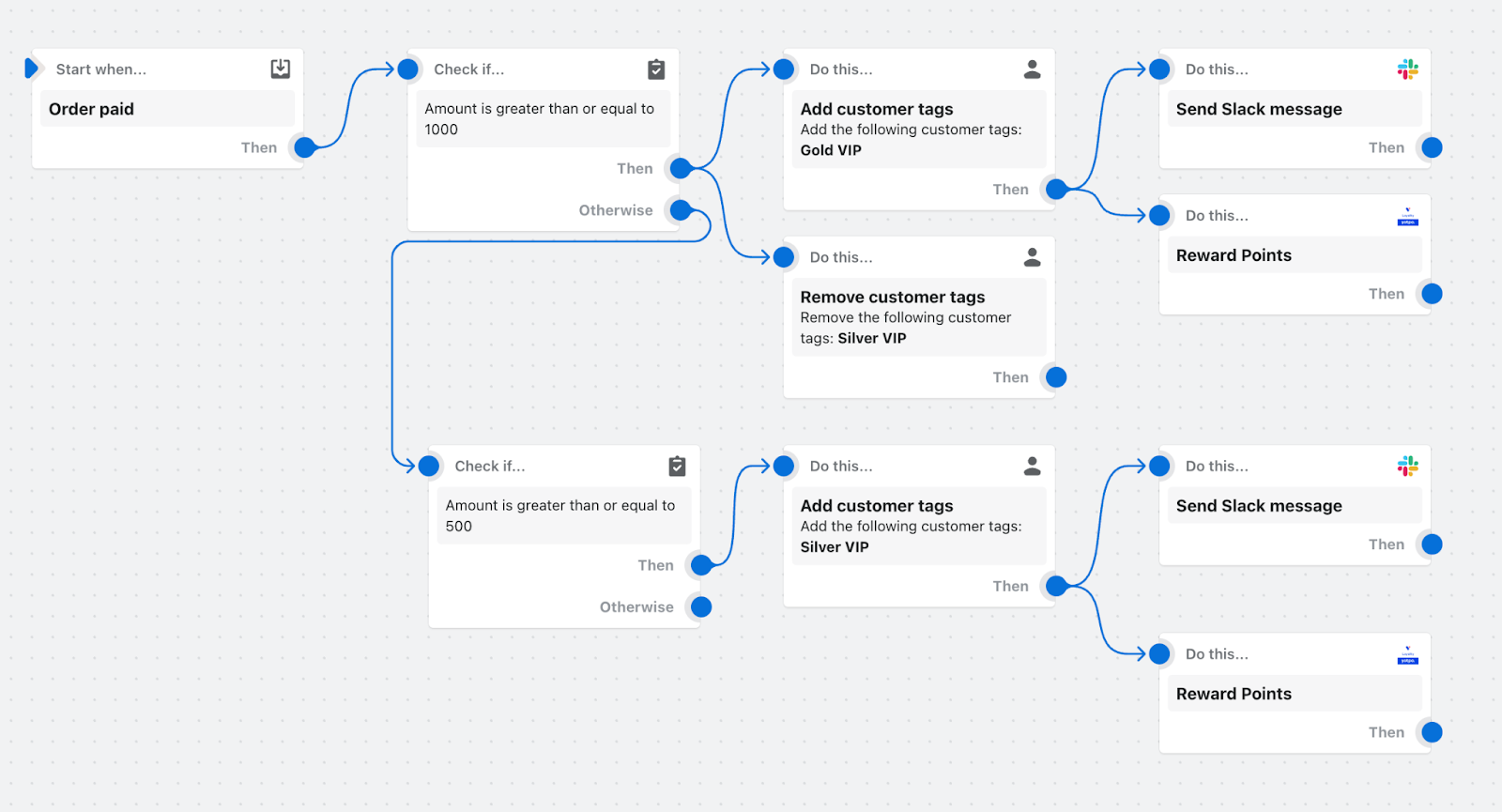
Apps Used: Yotpo Loyalty & Rewards, Slack
Benefit: Increases customer retention and lifetime value by targeting high-spending customers.
2. Review high-risk orders before capturing payment
Fraudulent orders can lead to costly chargebacks. With this template, Shopify Flow analyzes incoming orders and flags those that are deemed high-risk. If the risk is low or medium, payment is automatically captured.
For high-risk orders, Flow sends an alert to the customer service team to manually review the order before payment is processed.
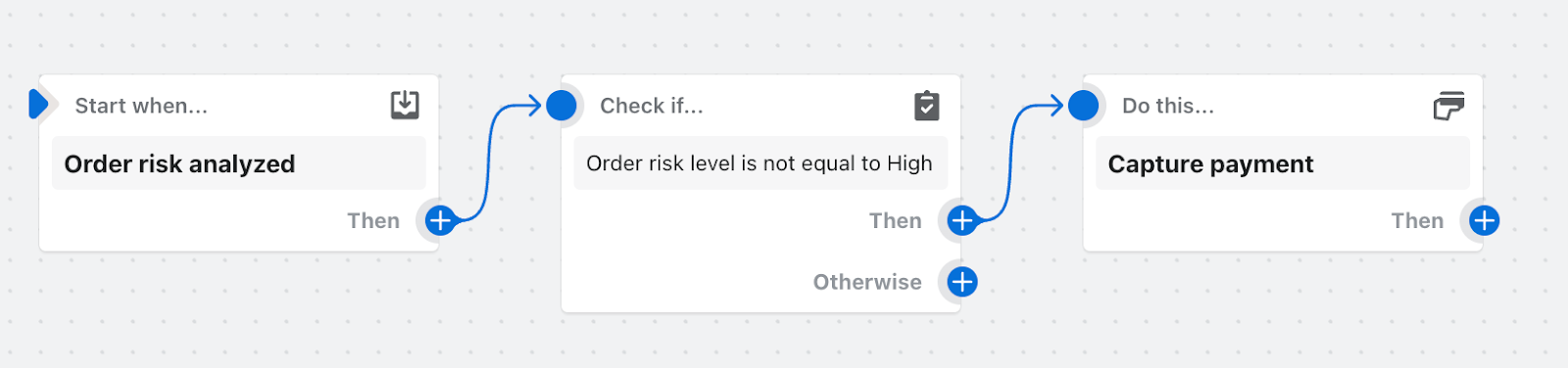
Apps Used: Shopify Manual Payment Capture
Benefit: Reduces chargebacks and fraud by automatically flagging suspicious orders.
3. Hide and republish products based on inventory level
Stockouts are inevitable, but managing them manually is inefficient. Shopify Flow helps by automatically hiding products that are out of stock and republishing them when they’re available again.
The template can also notify your marketing team to reactivate ads for restocked products.
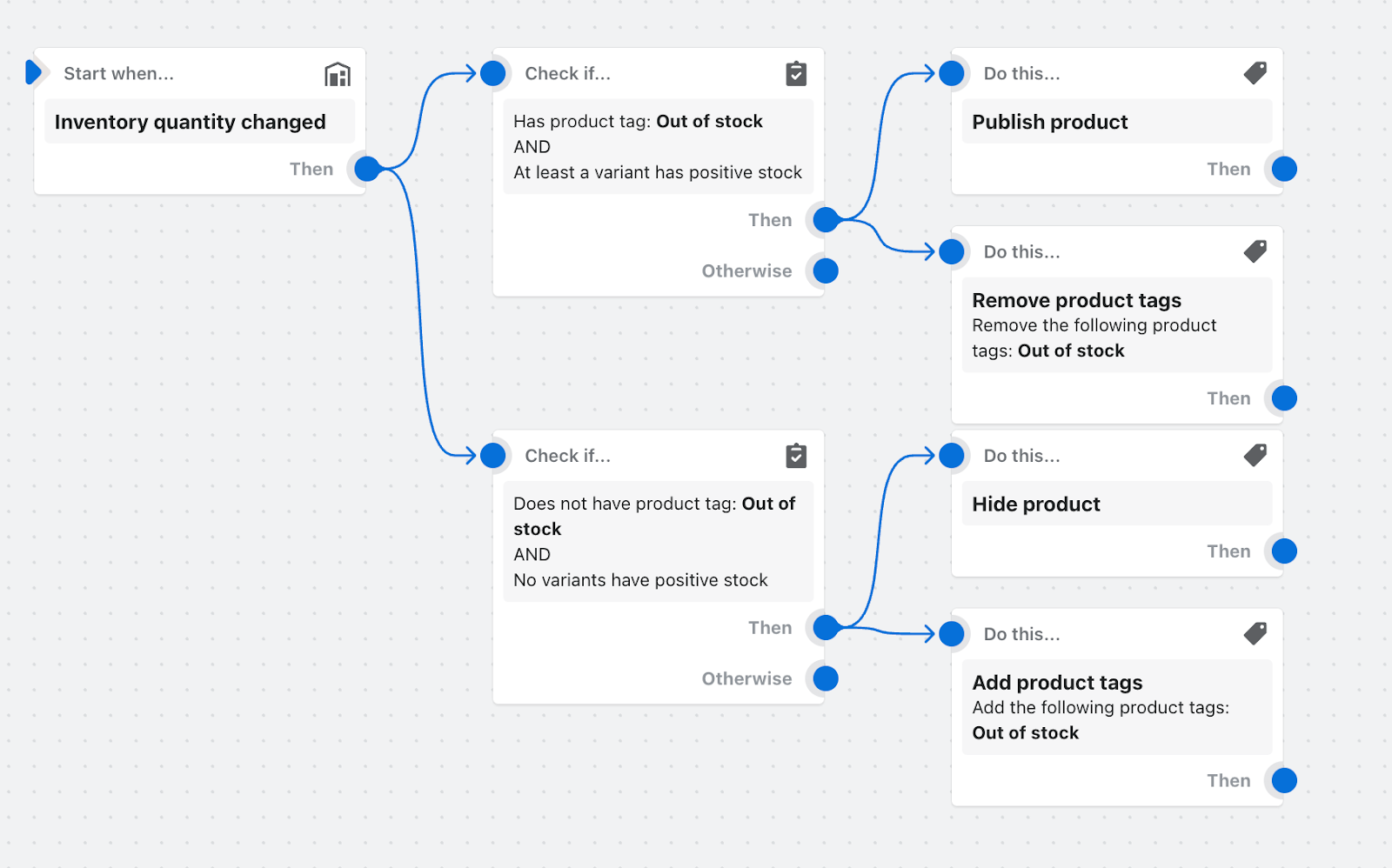
Benefit: Prevents customers from buying out-of-stock products, improving the customer experience.
4. Track pre-order purchases and kick off marketing campaigns
Pre-order campaigns are an excellent way to build excitement for new product releases. Shopify Flow automates the process of tracking pre-orders, sending details to your email marketing tool, and launching targeted email campaigns to nurture pre-order customers.
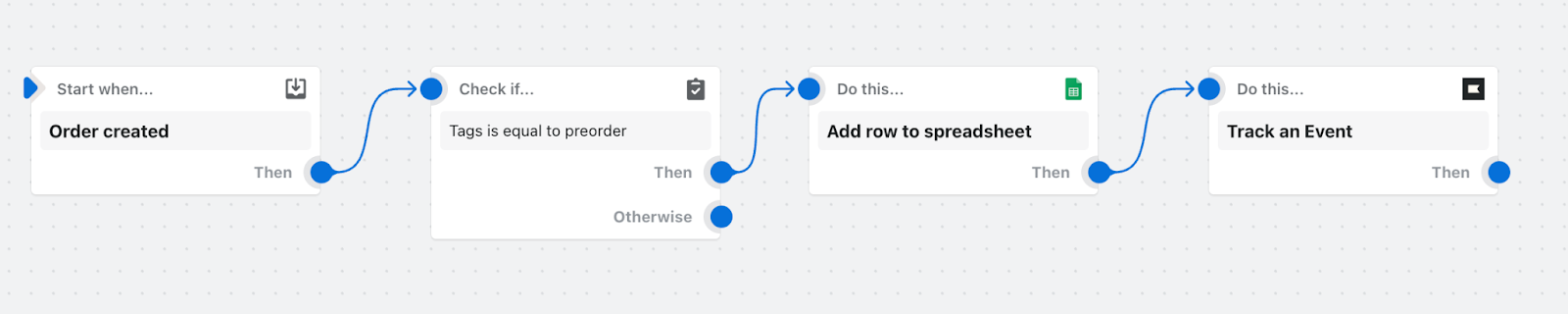
Apps Used: Klaviyo, Google Sheets for Shopify Flow
Benefit: Boosts customer engagement and ensures pre-order customers stay excited about their purchase.
5. Automate your product review process
Online reviews can significantly impact conversions. Shopify Flow automates your review management by categorizing reviews based on ratings and triggering specific actions.
For example: 5 star reviews are logged and shared with your sales and marketing teams, while low ratings trigger customer service to reach out and resolve issues.
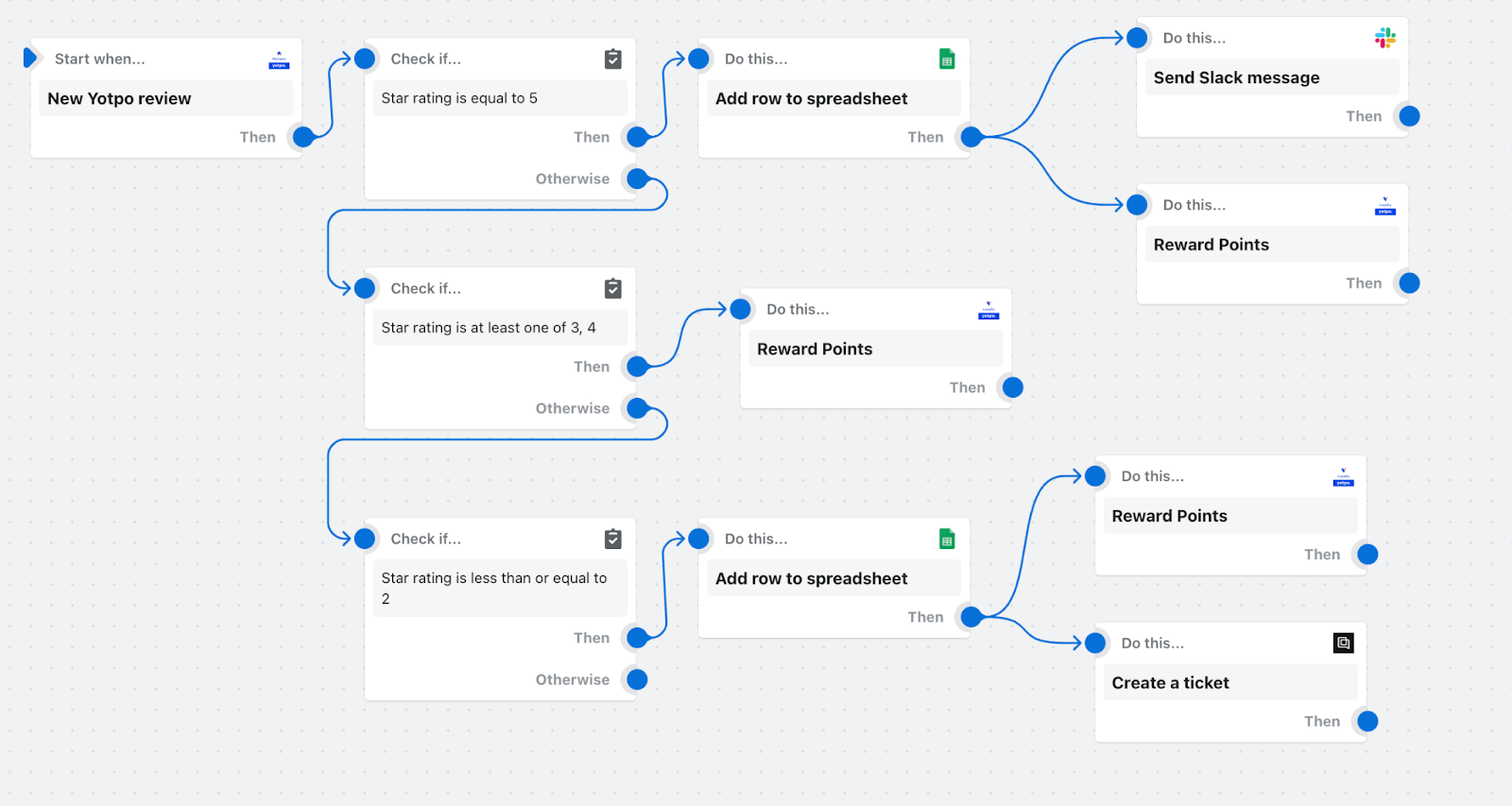
Apps Used: Yotpo Product Reviews, Google Sheets, Slack, Gorgias
Benefit: Improves brand perception and customer satisfaction by automating responses to reviews.
6. Cancel orders from known bad actors
During flash sales or high-traffic events, fraudulent activity can spike. Shopify Flow helps protect your store by automatically canceling orders from blacklisted email addresses or IP addresses that have been flagged for past fraudulent behavior.
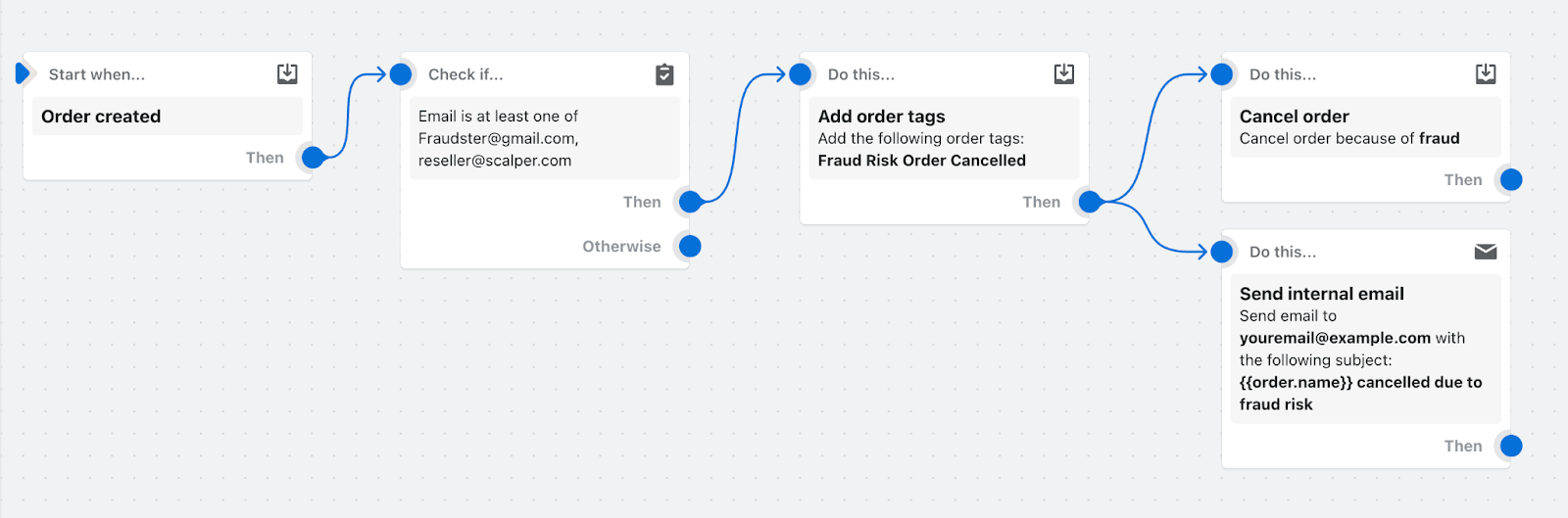
Benefit: Reduces the risk of fraud and chargebacks during high-volume sales events like Black Friday and Cyber Monday.
7. Automate your inventory management and reordering for low-stock items
Stay ahead of inventory shortages with this automated workflow. Shopify Flow checks inventory levels and, when a product is running low, automatically triggers a reorder email to your vendor and notifies your team via Slack.
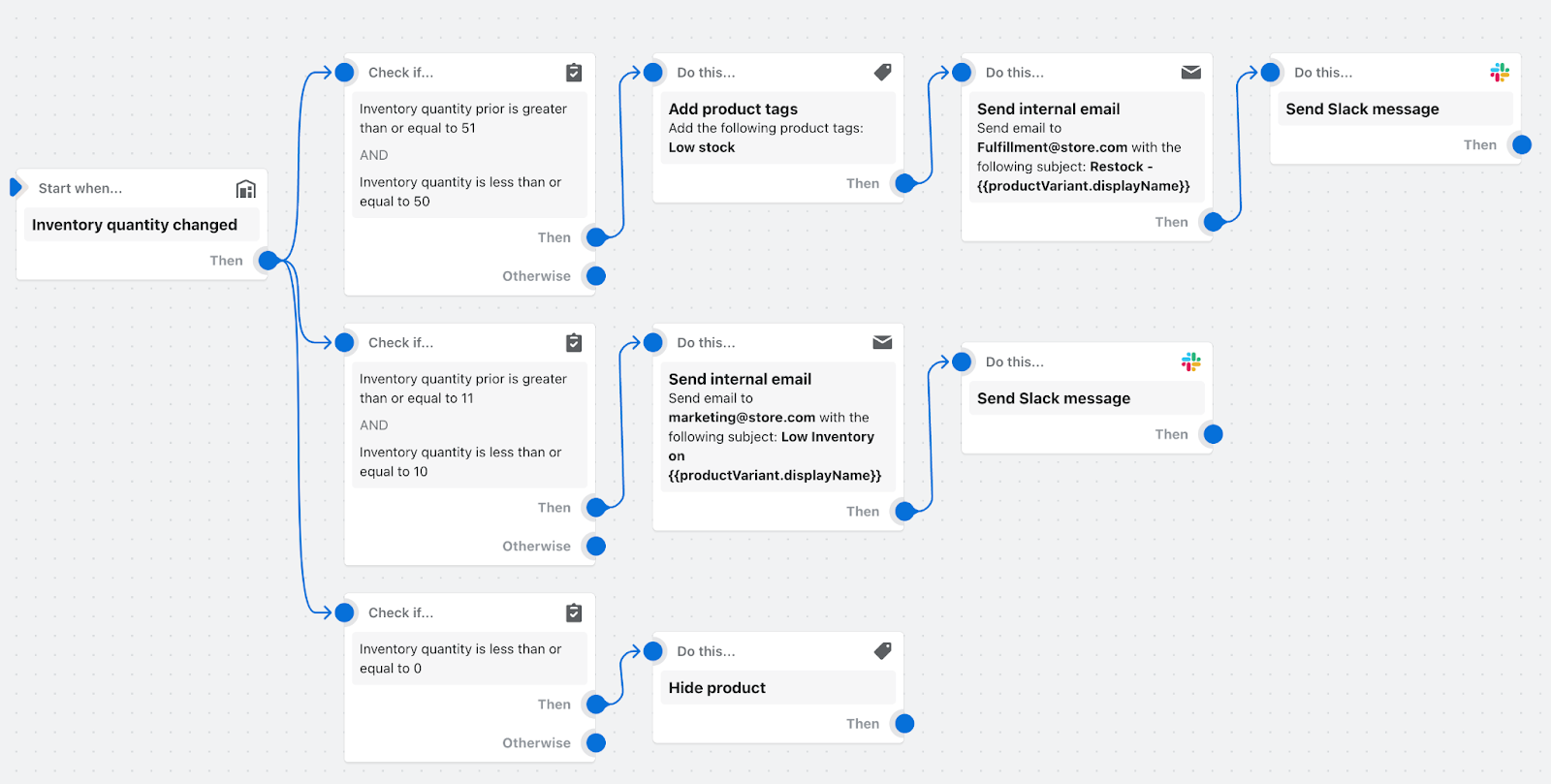
Benefit: Ensures you never run out of stock on high-demand products, reducing lost sales.
8. Gain insights into your returns
Understanding the reasons behind returns is crucial for improving your store’s experience. Shopify Flow tags customers who’ve requested returns over $100 and creates a customer service ticket to follow up on their experience.
This feedback loop helps identify issues and opportunities for improvement.
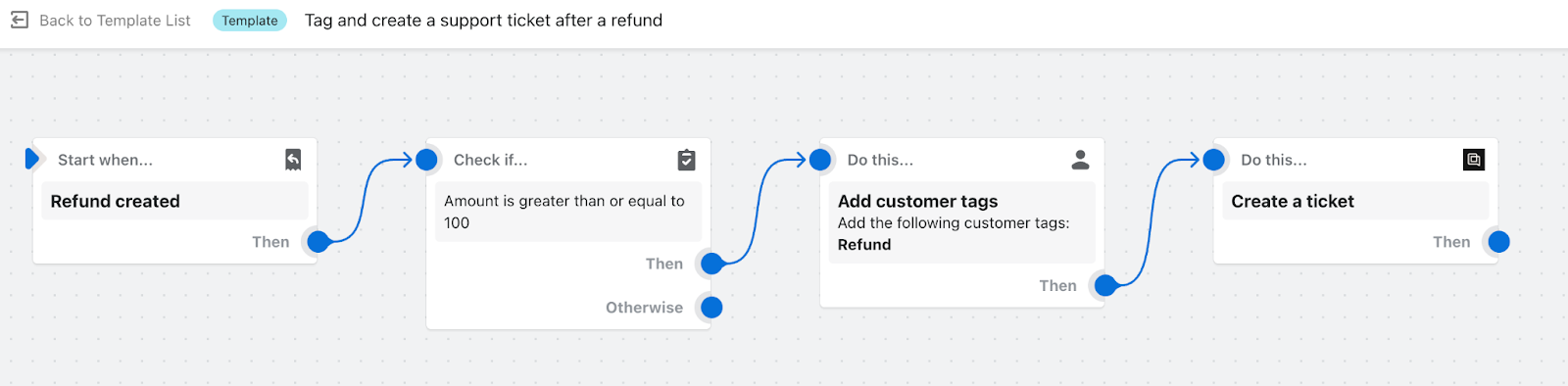
Apps Used: Gorgias
Benefit: Reduces returns by providing personalized customer support and insight into common pain points.
9. Notify customer service of a new draft order
Ensure your customer service team is always in the loop with this workflow. When a draft order is created, Shopify Flow automatically sends a Slack notification to your team, tagging the draft order and updating the order process status.
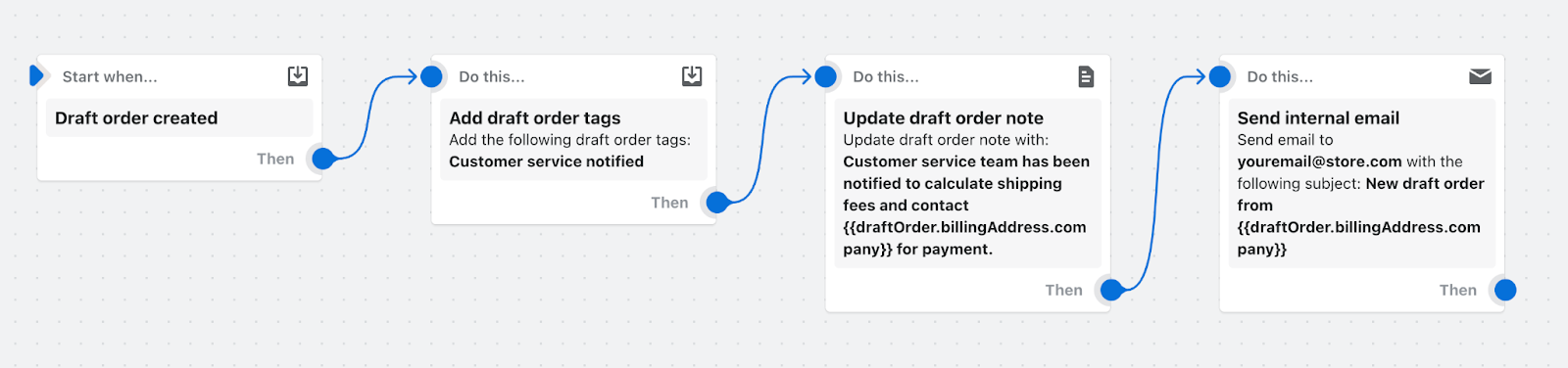
Benefit: Improves order accuracy and enhances internal communication across teams.
10. Track special orders based on conditions
Whether it’s a special discount, shipping method, or specific payment gateway, Shopify Flow lets you set up automated tracking for special orders based on custom conditions.
For example, if an order exceeds a certain threshold or comes from a specific channel, Flow tags it and notifies your team.
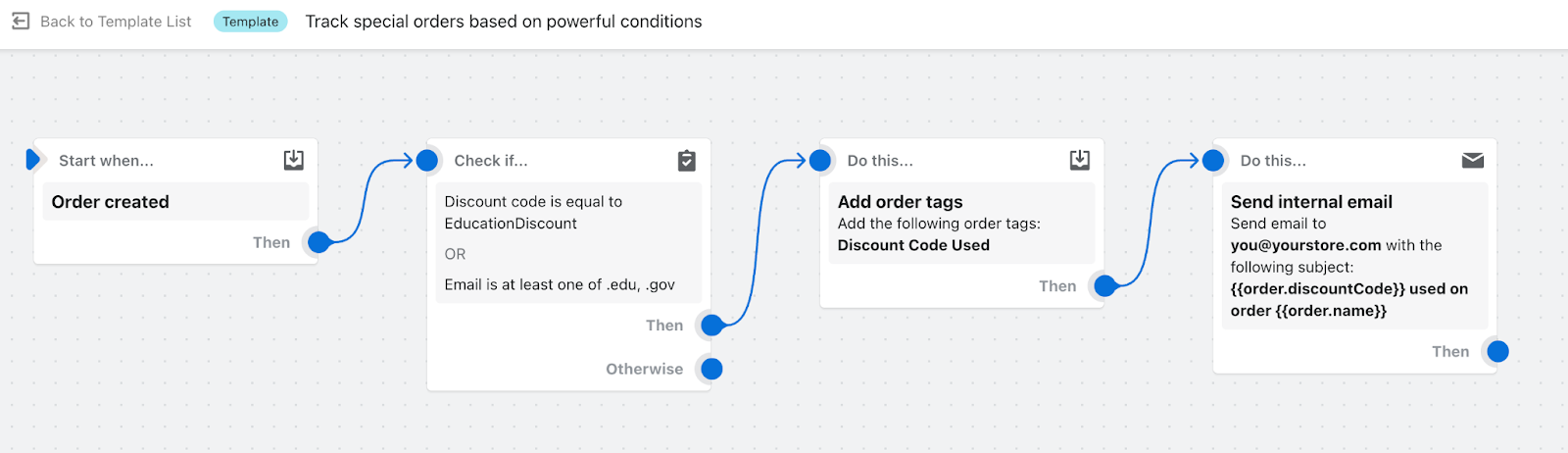
Benefit: Streamlines the management of special orders, saving time and reducing errors.
11. Send a handwritten note after customer places second order
Building a personal connection with customers can significantly boost retention. With this workflow, Shopify Flow triggers the sending of a handwritten note via the Scribeless app after a customer places their second order.
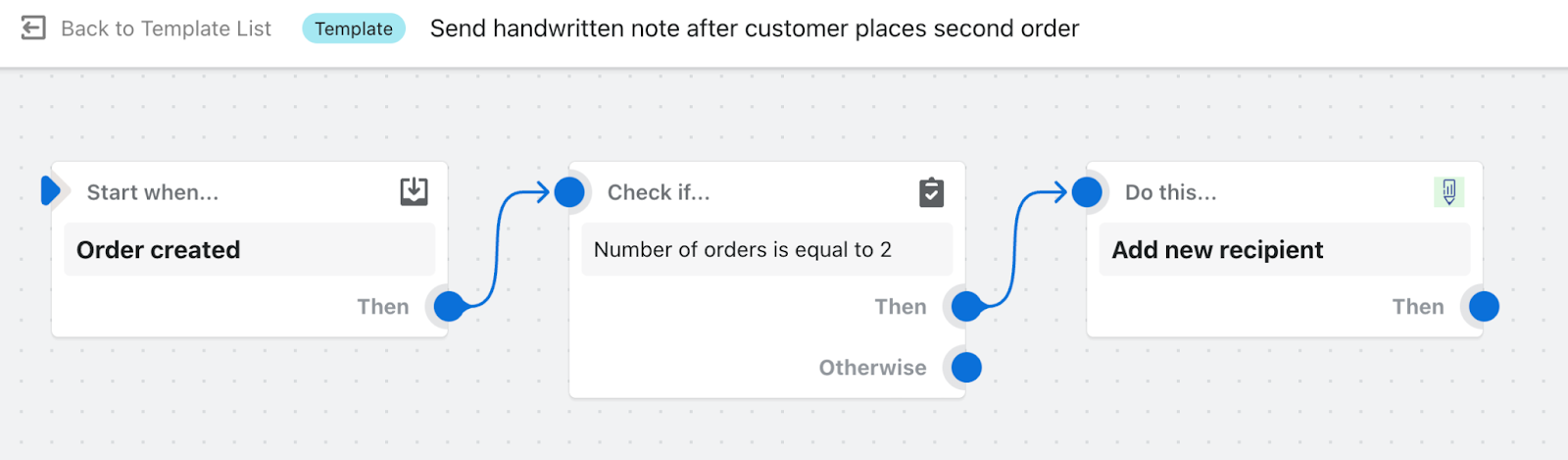
Benefit: Increases customer loyalty by offering a personal touch that enhances the customer experience.
12. Organize customers by lifetime spend tiers
Segmenting your customers by lifetime spend enables you to target your most valuable customers with personalized promotions and incentives. With this workflow, Shopify Flow automatically organizes customers into VIP tiers based on their total spend, allowing you to send tailored communications and special offers.
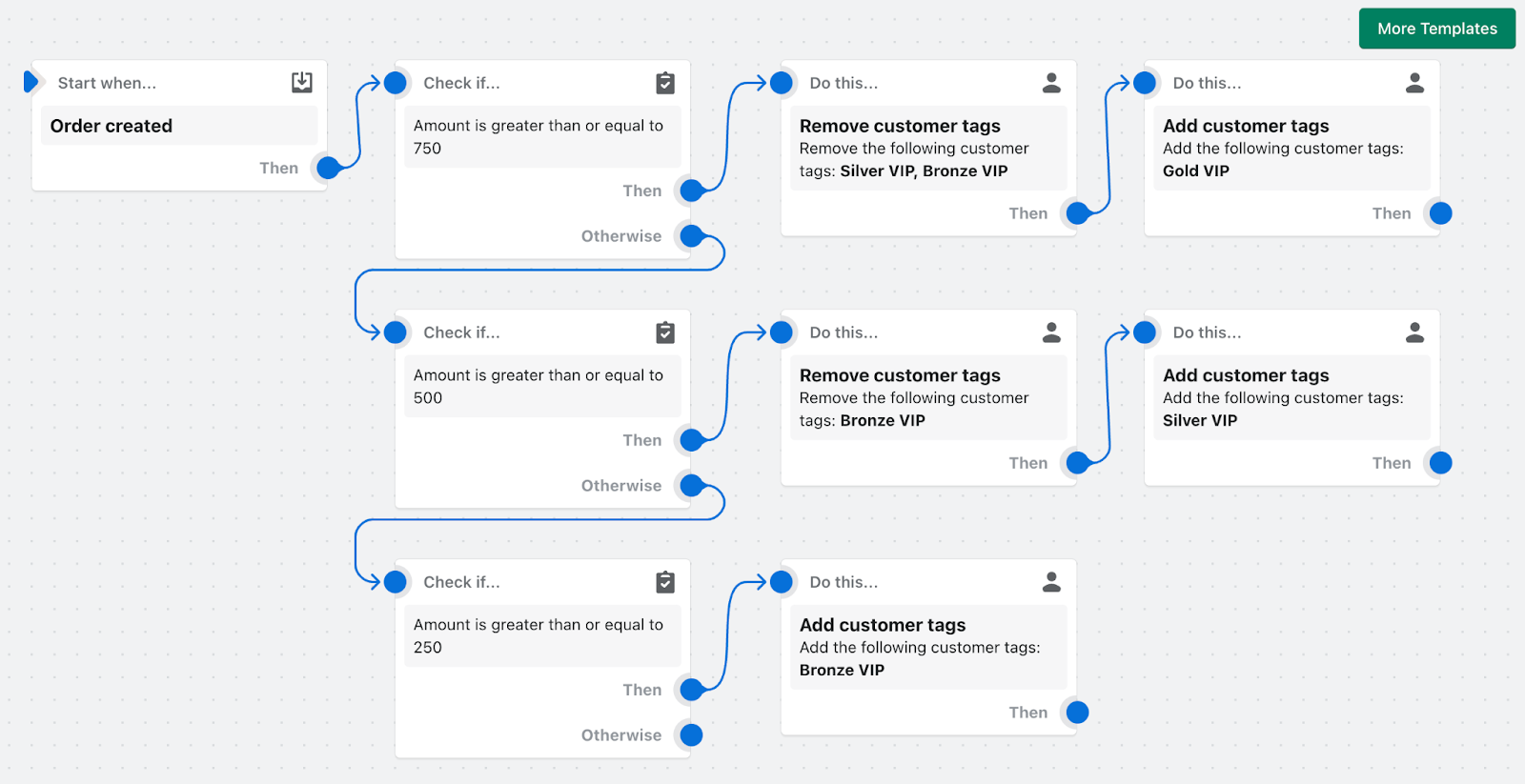
Benefit: Enhances customer retention and maximizes lifetime value by targeting high-value customers.
Advanced Shopify Flow Examples to Maximize Efficiency
1. VIP Customer Tagging Automation
Problem: Manual tagging misses high-value customers
Workflow:
- Trigger: When an order is paid
- Condition: Order total ≥ $250
- Actions:
- Add tags: “VIP”, “high-intent”
- Send a Klaviyo email: “Welcome to VIP”
- Send Slack alert to customer success team
2. Lifetime Value Tier System (Bronze/Silver/Gold)
Problem: No automatic loyalty tiers for customers
Workflow:
- Trigger: When an order is paid
- Conditions:
- If lifetime spend ≥ $1K → “Gold Tier” + 25% off
- If lifetime spend between $500-999 → “Silver Tier” + 15% off
- If lifetime spend between $250-499 → “Bronze Tier” + 10% off
3. Abandoned Cart Recovery Automation
Problem: High cart abandonment rates resulting in lost revenue
Workflow: (Leverage Shopify’s built-in template)
- Trigger: Cart abandonment
- Wait: 1 hour
- Actions:
- Send email reminder with a 10% discount
- Send SMS 24 hours later: “Complete your order + FREE shipping”
4. High-Risk Order Detection
Problem: Fraudulent orders leading to chargebacks
Workflow:
- Trigger: When an order is created
- Conditions:
- Shopify risk is marked as HIGH
- Billing address ≠ Shipping address + order > $500
- Customer has “fraud-flag” tag
- Actions:
- Hold payment for review
- Tag the order as “manual-review”
- Send Slack and email alerts to the finance team
5. Large Discount Alerts
Problem: Incorrect large discounts applied
Workflow:
- Trigger: When an order is created
- Condition: Discount > $100 or > 30%
- Actions:
- Send Slack alert to #order-approvals
- Hold fulfillment until reviewed
6. Gift Card Revenue Tracking
Problem: Difficulty tracking gift card sales and performance
Workflow:
- Actions:
- Tag gift card purchases
- Log gift card sales to Google Sheets for financial reporting
7. Low Stock Alerts with Dynamic Thresholds
Problem: Stockouts causing lost revenue opportunities
Workflow:
- Trigger: Inventory level changes
- Condition: Stock < 50
- Actions:
- Send Slack notification to inventory team
- Email the purchasing team
- Tag product as “low-stock”
- Advanced Liquid:
{% assign days_supply = inventory / 35 %}
{% if days_supply < 7 %} urgent-reorder {% endif %}
8. Multi-Location Inventory Balancing
Problem: Discrepancies between inventory levels across locations
Workflow:
- Actions: Auto-transfer excess inventory between locations
9. Email Triggers for Recent Buyers
Problem: Manual list-building impacting personalization
Workflow:
- Trigger: When an order is paid
- Actions:
- Add customer to Klaviyo “Recent Buyers” list
- Automatically send an email with an upsell offer
10. Slack Notifications for Key Events
Problem: Team constantly checking the admin dashboard
Workflow:
- Actions:
- Send real-time Slack alerts for high-value orders, low stock, and fraud
11. Daily Sales Reports to Google Sheets
Problem: Manual reporting takes too much time
Workflow:
- Actions:
- Schedule daily sales summary
- Automatically append sales data to Google Sheets
12. Customer Acquisition Cost (CAC) Tracking
Problem: Lack of insights on ad spend performance
Workflow:
- Actions:
- Extract UTM tags from orders
- Segment customers based on the UTM tags
- Reallocate budget to more cost-efficient channels
Common Shopify Flow Mistakes to Avoid
While Shopify Flow is powerful, it’s important to avoid some common mistakes to ensure smooth automation:
1. Over-Automating
Problem: Automating too many processes creates chaos.
Fix: Focus on automating tasks that save 5+ hours per week.
2. Poor Naming Conventions
Problem: Confusing workflow names like “New Workflow 1.”
Fix: Name workflows clearly with actionable formats like “VIP-Tag-$250+.”
3. No Edge Case Testing
Problem: Automation works for US orders but fails for international.
Fix: Always test your workflows with edge cases like international orders, pre-orders, etc.
Why Shopify Flow Automation is a Must-Have for Your Store
Shopify Flow empowers merchants to automate a wide range of tasks – from managing customer loyalty programs to handling high-risk orders. By leveraging these templates, you can streamline your processes, reduce manual work, and increase sales.
Each template is designed to integrate seamlessly with your Shopify store, saving you time and improving overall efficiency.
Start automating today and take your Shopify store to the next level with Shopify Flow!
Call to Action: Explore Shopify Flow Templates Now