
This guide breaks down everything you need to know about UCP: What it is, How the architecture works, How to implement it and critically for Shopify merchants & app developers – How to optimize your store for this new era of agentic commerce.
What is UCP ?
Universal Commerce Protocol (UCP) is a new open standard co-developed by Shopify and Google that lets AI agents (inside products like Google Search AI Mode or the Gemini app) discover products, build carts, and complete checkout using a shared “commerce language,” instead of custom integrations with every store.
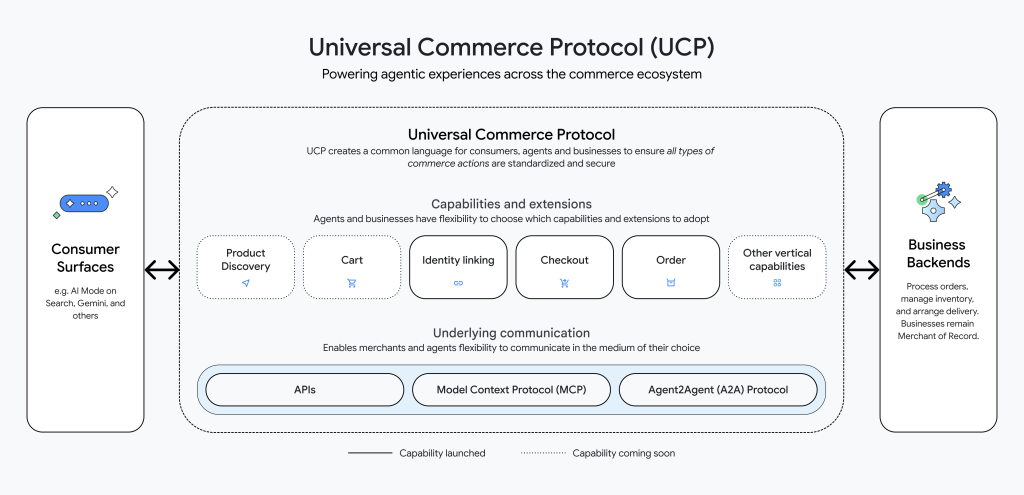
Launched in Jan 2026 with endorsement from major retailers including Walmart, Target, Etsy, and Wayfair. UCP represents the “HTTP moment” for commerce, a foundational protocol that will define how AI powered shopping works for the next decade.
Think of it like this:
- Before: every AI agent needed a bespoke integration for every merchant (N×N problem)
- Now: merchants publish what they support, agents publish what they support, and UCP negotiates a shared path automatically
Why this matters ?
Google and Shopify are positioning UCP as the foundation for agentic commerce: shopping where an AI assistant can do the work (research → compare → buy) with minimal user effort. Shopify specifically says native shopping experiences on Google surfaces are rolling out, and that Shopify merchants can sell through AI Mode and Gemini.
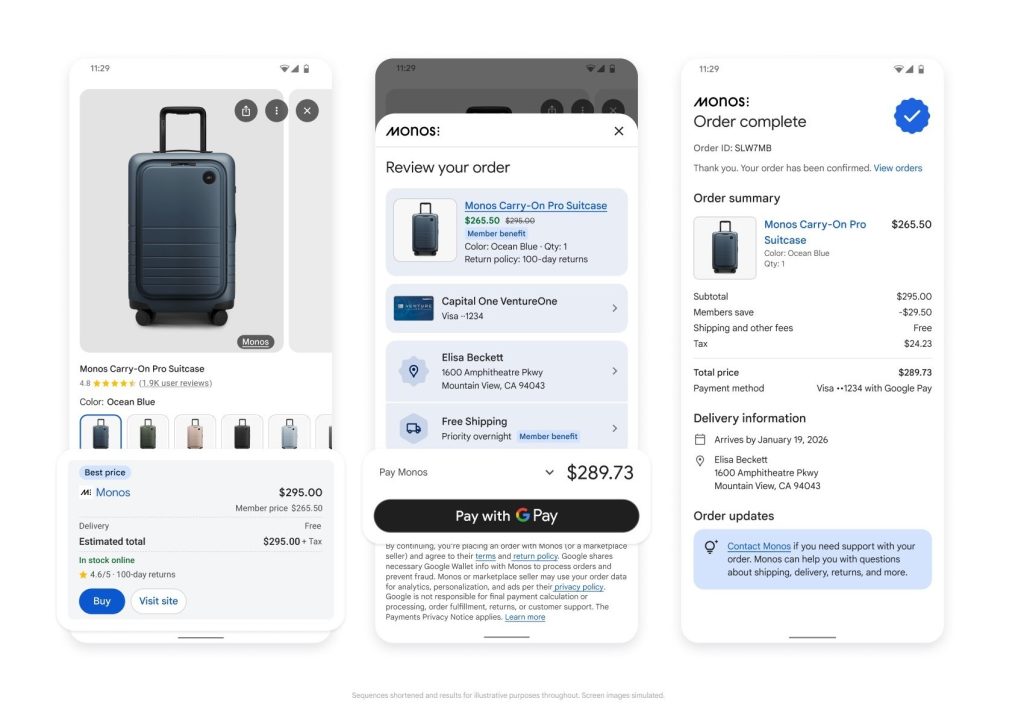
For merchants, the shift is simple but huge:
- You’re not only “ranking on Google” anymore
- You’re being selected by an agent that prefers clean data, clear policies, and reliable fulfillment signals
How UCP works ?
UCP has three big ideas:
1) A manifest at /.well-known/ucp
Your store (or Shopify on your behalf) publishes a machine-readable manifest that describes:
- which UCP services you support
- which capabilities you support (checkout, catalog, orders, etc.)
- which payment handlers you accept
- which extensions you use (loyalty, subscriptions, special fulfillment rules, etc.)
2) Negotiation (intersection of capabilities)
An agent fetches your manifest, shares its own profile, and both sides compute the overlap.
Result: the agent only attempts what both sides can actually do, and avoids breaking flows.
3) A “state machine” checkout with graceful fallback
If the agent can’t complete a step (e.g., missing info, a capability it doesn’t support, identity checks, etc.), the flow doesn’t die.
Instead, it can hand off to a human-friendly web continuation (embedded checkout / browser continuation), then resume. Shopify explicitly highlights escalation/embedded checkout as part of the approach.
Core Architecture: How UCP Actually Works
UCP is built like a layered protocol: The Three-Layer Stack
1. Shopping Service
Defines core transaction primitives: checkout sessions, line items, totals, messages, and status.
This layer knows nothing about specific domains like fulfillment or discounts. It just handles the universal mechanics of a transaction.
The universal objects that most transactions share:
- Messages and status updates
- Cart/line items
- Totals
- Checkout session
2. Capabilities
Major functional areas that build on the shopping service:
dev.ucp.shopping.checkout— Create and manage checkout sessionsdev.ucp.shopping.catalog— Product discovery and searchdev.ucp.shopping.orders— Post-purchase order management
Examples you’ll see referenced in UCP materials:
- catalog (discovery/search)
- checkout (session creation + completion)
- orders (post-purchase actions)
3. Extensions
Domain-specific schemas that augment capabilities. For example:
dev.ucp.shopping.fulfillment— Shipping, pickup, local delivery, split shipmentsdev.ucp.shopping.discount— Discount codes and automatic promotions- Custom extensions like
com.loyaltyprovider.pointsfor loyalty programs
Extensions compose with capabilities without modifying core schemas. A merchant using a third-party loyalty provider simply declares that extension in their profile – agents that support it can negotiate loyalty features; agents that don’t simply skip it.
This is where real commerce becomes real:
- loyalty
- subscriptions
- complex fulfillment rules
- B2B pricing logic
- custom compliance requirements
UCP is designed so extensions can exist without breaking the core protocol, and merchants/agents can opt into them only when both sides understand them.
What Shopify merchants should do ?
Shopify’s public messaging is clear: UCP is the path to selling inside AI surfaces, and Shopify is building the connective tissue.
Here’s the merchant playbook that actually moves the needle:
1) Fix product data like an agent will read it
Agents don’t “browse vibes.” They choose based on structured confidence.
Do this:
- Titles that match how buyers ask (“men’s running shoes wide”, “organic baby shampoo sulfate free”)
- Consistent variants (size/color), consistent images
- Bulletproof attributes: material, dimensions, compatibility, certifications, care instructions
- Clear pricing (no surprise fees), clear availability
2) Make fulfillment and returns “boringly clear”
Agents will prefer merchants with fewer unknowns.
Do this:
- Shipping methods + delivery windows that are predictable
- Clean return policy language (what’s eligible, timelines, fees)
- Accurate inventory (avoid cancelations/refunds after agent checkout)
3) Ensure payments are frictionless
UCP supports negotiating payment handlers (wallets, provider rails). Shopify highlights commerce with agents at scale and embedded checkout experiences; Google notes UCP works across the journey and payments ecosystem.
Do this:
- Keep Shop Pay / wallet options clean where available
- Avoid unnecessary checkout blockers (extra mandatory steps unless legally required)
4) Get ready for “AI attribution weirdness”
This is a new funnel. Some industry commentary notes there are tradeoffs/unknowns around reporting and participation details as UCP checkout rolls out.
Do this now:
- Tighten UTMs / measurement hygiene
- Treat “agentic surfaces” like a new acquisition channel
- Watch product-level profitability (agents may drive different baskets)
What Shopify app developers should do ?
(how to win in UCP)
If you build apps that affect checkout, pricing, fulfillment, identity, loyalty, subscriptions, warranties, etc., UCP is an opportunity to become the “capability” an agent can actually use.
Shopify’s developer docs position UCP as the shared language across agents, merchants, PSPs, and credential providers, and mention Shopify provides MCP tools that are UCP compliant for building.
Read: Shopify Agentic Commerce: The Complete 2026 Guide
Your goal as an app developer
Build features so they can be:
- Declared (in the manifest / capability profile)
- Negotiated (agent supports it or not)
- Executed (agent can call it safely)
- Degraded gracefully (fallback path exists)
A clean extension pattern
Use reverse-domain naming:
- If you own
myapp.com, usecom.myapp.*
Your extension schema should be stable and versioned.
{
  "$id": "https://myapp.com/ucp/extensions/loyalty.json",
  "type": "object",
  "properties": {
    "member_id": { "type": "string" },
    "points_balance": { "type": "integer" },
    "redeemable_points": { "type": "integer" }
  }
}
Then merchants can declare your capability/extension (conceptually) and agents that understand it can use it; others skip it.
Design rule: never make your extension “required” unless it truly must block checkout. If your extension blocks too often, agents will learn to avoid stores using it.
UCP changes “SEO” into “AEO for transactions”
You still need content. But the priority shifts:
Old world (mostly)
- Rank pages
- Convince humans
- Optimize conversion UX
New world (increasingly)
- Agents query structured data and capabilities
- Agents prefer merchants with fewer unknowns
- The “best answer” might include a purchase button inside the conversation
Shopify and Google both frame UCP as enabling commerce across “consumer surfaces” and agentic journeys.
What to publish in 2026 (merchant content strategy):
- Short “decision support” FAQs (materials, warranty, sizing, compatibility, safety)
- Comparison-friendly copy (what’s included, what’s not, who it’s for)
- Consistent terminology (don’t rename standard concepts into cute brand terms)
Common mistakes (that will make agents avoid you)
- Messy variants (agents hate ambiguity: “One Size”, “Free Size”, “OS”, mixed together)
- Hidden costs (shipping surprises, fees at checkout)
- Overly complex discount logic that breaks predictability
- Inventory lies (in-stock but not actually fulfillable)
- Checkout blockers with no fallback path (or frequent escalations)
Each capability is independently versioned.
Discovery and Negotiation: The Protocol in Action
UCP’s power lies in its dynamic negotiation model. Both merchants and agents publish capability profiles, and the protocol computes what’s mutually supported per transaction.
How Negotiation Works
- Agent requests merchant’s manifest from
/.well-known/ucp - Agent passes its own profile URL in request headers
- Merchant computes intersection – which capabilities both support, which payment handlers overlap, which extensions are mutually understood
- Response is scoped to only what both parties can handle
This mirrors how HTTP negotiates content types via Accept headers, but for entire commerce capabilities.
The Checkout State Machine
Every checkout session progresses through defined states:
| Status | Meaning | Agent Action |
|---|---|---|
incomplete | Missing required information | Attempt to resolve via API |
requires_escalation | Buyer input needed | Hand off to human via continue_url |
ready_for_complete | All information collected | Finalize programmatically |
When an agent can’t complete a step: perhaps the merchant requires identity verification, or the agent doesn’t support a required extension – UCP provides a continue_url that lets the buyer seamlessly continue in a browser. The transaction is never abandoned.
Payment Handler Negotiation
Merchants optimise PSP relationships for years. Buyers have wallet preferences. UCP lets both sides express what they support, then negotiates per transaction.
Two-Sided Payment Matching
The agent profile declares supported payment instruments:
json{
  "payment": {
    "handlers": [
      { "name": "google.pay", "version": "2026-01-11" },
      { "name": "com.shopify.shop_pay", "version": "2026-01-11" }
    ]
  }
}
The merchant response includes available handlers for this specific cart:
json{
  "payment": {
    "handlers": [
      {
        "id": "shop_pay",
        "name": "com.shopify.shop_pay",
        "config": { "shop_id": "abc123" }
      },
      {
        "id": "google_pay",
        "name": "google.pay",
        "config": { "merchant_id": "xyz789" }
      }
    ]
  }
}
The intersection (Shop Pay and Google Pay in this case) becomes the buyer’s choice. Change the cart contents, buyer region, or transaction amount, and available handlers may shift. Payment handlers use reverse-domain naming just like capabilities – each provider publishes their own spec, and merchants simply advertise which handlers they accept.
Implementing UCP: Step-by-Step for Shopify
For Shopify merchants, the fastest path to UCP is through Shopify’s native infrastructure. Here’s what the implementation looks like.
Prerequisites
- Shopify store with products synced to Shopify’s catalog
- Agentic Storefronts enabled (check Shopify admin for eligibility)
- Google Merchant Center account connected (required for Google’s AI Mode implementation)
For Merchants: The Managed Path
Shopify merchants on eligible plans get UCP support through Shopify’s Agentic Storefronts feature. Shopify handles:shopify+1
- Hosting the
/.well-known/ucpmanifest - Exposing checkout, catalog, and order capabilities
- Payment handler configuration (Shop Pay built-in)
- Integration with Google’s AI Mode
Your role is to ensure:
- Product data quality: Accurate titles, descriptions, structured attributes
- Inventory sync: Real-time availability for agents to query
- Fulfillment configuration: Clear shipping options and delivery windows
For App Developers: Building UCP Capabilities
If you’re building a Shopify app that needs to participate in UCP flows (e.g., loyalty programs, custom fulfillment, subscriptions), you’ll implement a UCP extension.
Step 1: Define your extension namespace
UCP uses reverse-domain naming. If you own myapp.com, your extension namespace is com.myapp.*. No registry approval needed.
Step 2: Publish your extension schema
Create a JSON schema that defines your extension’s data model and host it at a stable URL:
json{
  "$id": "https://myapp.com/ucp/extensions/loyalty.json",
  "type": "object",
  "properties": {
    "member_id": { "type": "string" },
    "points_balance": { "type": "integer" },
    "redeemable_points": { "type": "integer" }
  }
}
Step 3: Merchants declare your extension
When merchants install your app, their UCP manifest includes your extension:
json{
  "capabilities": [
    {
      "name": "com.myapp.loyalty",
      "version": "2026-01",
      "spec": "https://myapp.com/ucp/extensions/loyalty",
      "extends": "dev.ucp.shopping.checkout"
    }
  ]
}
Step 4: Handle extension data in checkout flows
When an agent that supports your extension initiates checkout, your app receives and returns loyalty specific data alongside the core checkout schema.
Testing Your UCP Implementation
The official UCP playground at ucp.dev lets you test capabilities against your implementation.
Using the Python Sample Implementation
Google provides a reference implementation you can run locally
bash# Clone the SDK and samples
mkdir sdk
git clone https://github.com/Universal-Commerce-Protocol/python-sdk.git sdk/python
git clone https://github.com/Universal-Commerce-Protocol/samples.git

# Set up the sample business server
cd samples/rest/python/server
uv sync

# Create a test product database
mkdir /tmp/ucp_test
uv run import_csv.py \
  --products_db_path=/tmp/ucp_test/products.db \
  --transactions_db_path=/tmp/ucp_test/transactions.db \
  --data_dir=../test_data/flower_shop

# Start the server
uv run server.py \
  --products_db_path=/tmp/ucp_test/products.db \
  --transactions_db_path=/tmp/ucp_test/transactions.db \
  --port=8182
Then test discovery and checkout flows:
bash# Discover merchant capabilities
curl -s -X GET http://localhost:8182/.well-known/ucp

# Create a checkout session
curl -s -X POST "http://localhost:8182/checkout-sessions" \
  -H 'Content-Type: application/json' \
  -H 'UCP-Agent: profile="https://agent.example/profile"' \
  -d '{
    "line_items": [{"item": {"id": "bouquet_roses"}, "quantity": 1}],
    "buyer": {"full_name": "Test User", "email": "test@example.com"},
    "currency": "USD"
  }'
UCP and the Future of E-commerce SEO
Here’s what most guides miss: UCP doesn’t just change how transactions happen—it fundamentally shifts how products get discovered.
From Keywords to Capabilities
Traditional SEO optimises for search engine crawlers parsing HTML. Agentic commerce optimizes for AI agents querying structured capabilities. Your product data needs to be
- Structured: JSON schemas, not just HTML markup
- Capability-aligned: Attributes that map to UCP extensions (materials, dimensions, compatibility, energy efficiency)
- Real-time: Live inventory and pricing, not cached feeds
Merchant Center Becomes Critical
Google’s implementation of UCP requires products in Merchant Center with checkout eligibility. The new data attributes Google announced answers to common product questions, compatible accessories, substitutes are designed specifically for AI Mode discovery.
Answer Engine Optimisation (AEO/GEO)
Your content strategy should include:
- Structured FAQs that AI agents can parse and cite
- Clear entity definitions for your products, brand, and capabilities
- Consistent terminology matching UCP specs (don’t invent synonyms for standard capability names)
When an AI agent answers “What’s the best sustainable yoga mat under $100?”, your product is more likely to be recommended if your catalog includes structured sustainability attributes that UCP extensions can negotiate.
Protocol Ecosystem: UCP, MCP, A2A, and AP2
UCP doesn’t exist in isolation. It’s designed for interoperability with the emerging agent protocol stack:
| Protocol | Purpose | UCP Integration |
|---|---|---|
| MCP (Model Context Protocol) | Connects AI models to external tools | UCP capabilities can be exposed as MCP tools |
| A2A (Agent-to-Agent) | Direct agent communication | UCP supports A2A as a transport layer |
| AP2 (Agent Payments Protocol) | Secure agentic payments | UCP checkout integrates AP2 for payment mandates |
| ACP (Adobe Commerce Protocol) | Adobe’s commerce standard | Complementary; UCP designed for interoperability |
For Shopify developers, the practical implication is that UCP-enabled capabilities can be consumed by any AI system that speaks MCP or A2A – not just Google’s products.
What This Means for Your Shopify Business ?
UCP adoption is moving fast. Google’s AI Mode checkout is already live for eligible US retailers, with global expansion planned for 2026.
Here’s your action plan:
Immediate Steps
- Verify Agentic Storefronts eligibility in your Shopify admin
- Connect Google Merchant Center if not already done
- Audit product data quality – AI agents are ruthless about missing or inconsistent attributes
- Enable Shop Pay for frictionless agentic checkout
Near-Term
- Implement new Merchant Center attributes as Google rolls them out
- Review your catalog for UCP-relevant attributes : materials, dimensions, compatibility, certifications
- Test your store against the UCP playground
- If building apps: Start designing UCP extensions for your functionality
Strategic
- Rethink content strategy for answer engine optimisation
- Build direct relationships with AI surfaces (Business Agent, branded experiences)
- Monitor Direct Offers beta if running Google Ads
UCP represents the most significant shift in e-commerce infrastructure since the move to mobile. For Shopify developers and merchants, the opportunity is clear: those who implement UCP early will be discoverable in the places where shopping is increasingly happening inside AI conversations.
The bazaar is open.